Relay Card
Starting with HAI Generation 2 (HAIGen2), the usage of relay cards is supported. This chapter aims to provide detailed information on relay card functionality on veHaaS Assemblies for test engineers. This additional feature provides greater flexibility in the configuration of Assemblies.
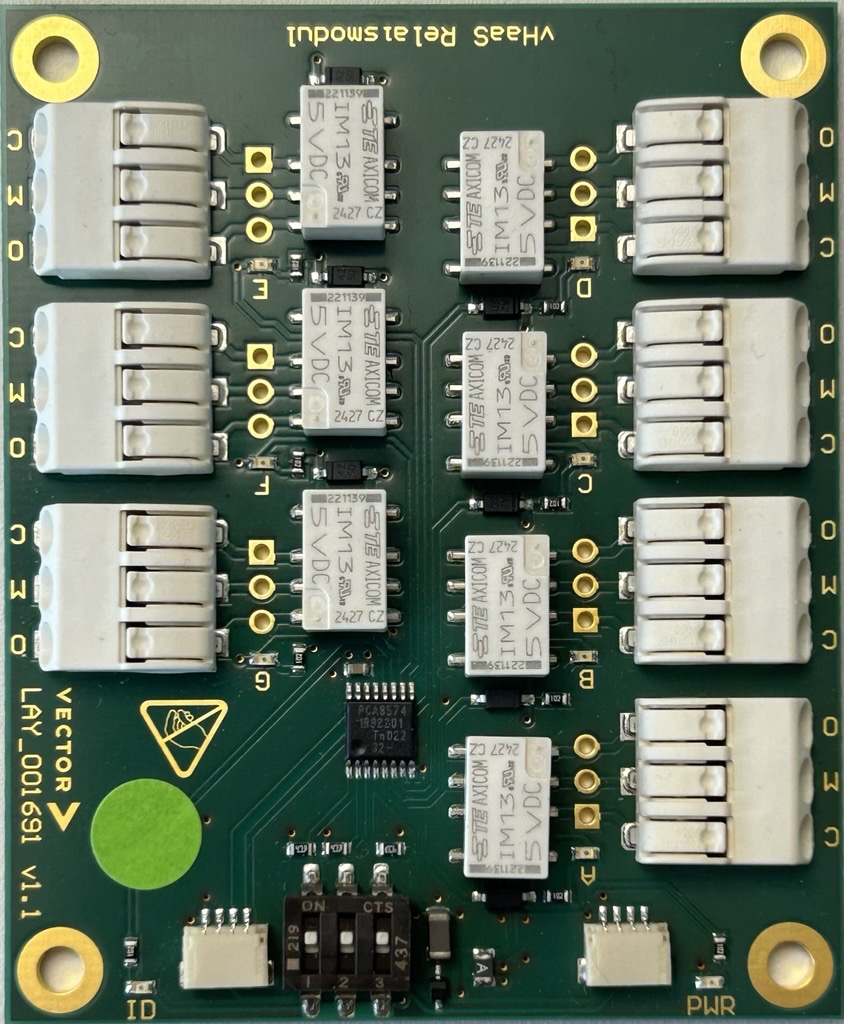 { width=50% }
Introduction
By integrating the relay-cards, Assembly peripheral modules can be used differently according to varying requirements. This increases the coverage of changing use cases per Assembly, which improves availability, reduces waiting time, and increases development speed.
Motivation
The optional relay card enables physical customization of an Assembly with up to seven independent channels per card.
Channels can be used during setup or operation — for example, to simulate faults such as line breaks.
Another use case is switching devices on/off without requiring the current monitoring functionality included in the HAIGen2 channels.
The Relay card provides the opportunity to control more devices in hardware setups where 10 channels are insufficient.
Functional Overview
The relay-cards is integrated at Assembly level during the initial setup of the Assemblies by the veHaaS Cluster Service Team.
In the GUI, multiple relays are structured as a block. Each block has the preconfigured channel connections available.
A channel can be set to on/off during setup or measurement.
Configuration
It is possible to use up to eight relay-cardss in the same Assembly. A connection can be established between a channel (e.g., CH A) and the power signal 5V, GND, or an open line. More than one channel can be switched non-exclusively, which means that multiple channels can be active at the same time. There are 8 channels total on each relay-cards. Channels A through G can be connected to devices, while channel H is connected to an on-board LED for veHaaS maintainers. The relay-cards I2C address is fixed and can only be changed by veHaaS maintainers.
Endpoints
The Relay card is controlled by the Assembly HAI. Therefore, the respective HAI can be instructed to configure the hardware.
⚠️ Caution
The relay card devices must be initialized by setting the hardware to channel O.
ℹ️ Limitations
The status endpoint requires an address (two-digit hex number with "0x" prefix, e.g., 0x27). For the configuration endpoint, a JSON body is necessary. The JSON body must contain 2 additional values:
- activate_channels: Array containing desired channels to be activated, represented as capital characters from A to H, or capital O to activate all channels.
-
deactivate_channels: Array containing desired channels to be deactivated, represented as capital characters from A to H, or capital O to deactivate all channels.
-
Status endpoint:
Used to get the current state of the relay-cards hardware.
Jumpers
Work in progress
This section is being written. Content marked with <!-- TODO --> needs to be filled in.
A jumper is a physical short-circuit connector that routes a HAIGen2 channel to a specific device or signal line (e.g. 5V, GND, or open line). Together with the relay card, jumpers allow the physical wiring of an Assembly to be reconfigured without hardware disassembly.
-
Configuration endpoint:
Used to configure the relay-cards hardware.