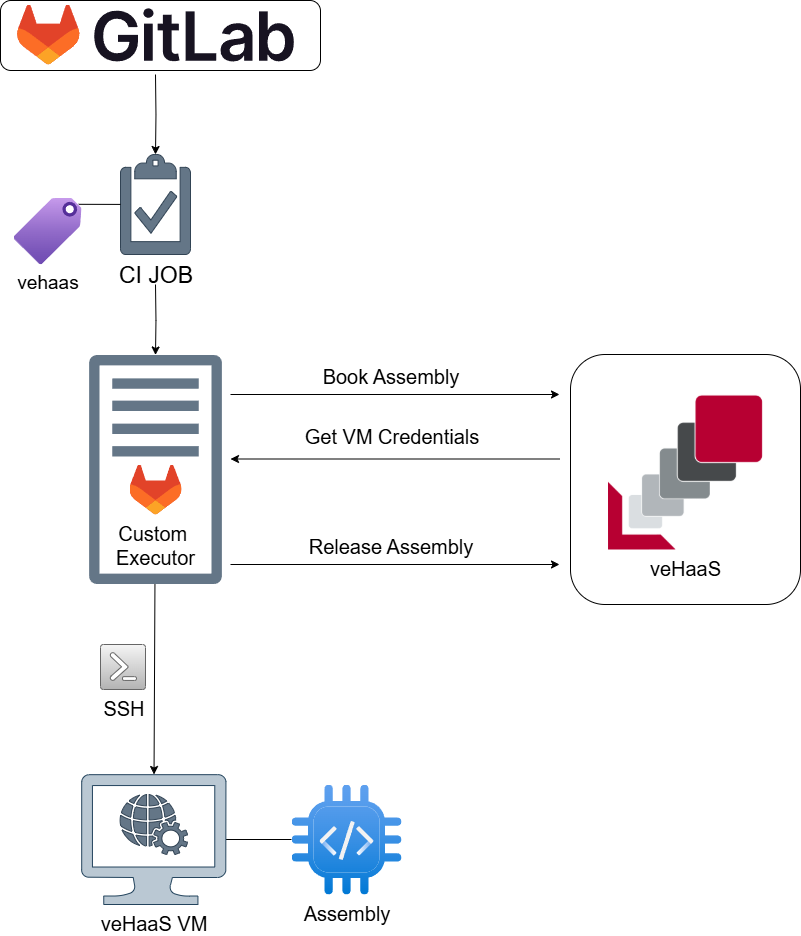
Basic CI integration
The veHaaS custom GitLab runner provides seamless integration of hardware assemblies into your CI/CD pipelines. This runner automatically handles the booking, connection, and execution of CI jobs on veHaaS virtual machines.
Setup Instructions
-
Create veHaaS Access Token
-
Configure GitLab CI Variables:
In your GitLab project, go to Settings → CI/CD → Variables and add a new variable (GitLab CI Variables):
Variable Description VEHAAS_TOKEN The token to authenticate with the veHaaS API. -
Configure Your CI Job
Add the following configuration to your
.gitlab-ci.ymlfile:
Configuration Variables
| Variable | Description | Example |
|---|---|---|
ASSEMBLY_REF |
Specifies which assemblies to use (First available of list gets selected) | "ASSEMBLY-1004" or "ASSEMBLY-1, ASSEMBLY-2" |
SESSION_DURATION |
Duration to book the assembly in minutes | 30 |
SESSION_TIMEOUT |
Maximum time to wait for assembly availability in minutes | 10 |
Examples
Basic Example
test:
  tags:
    - vehaas
  variables:
    SESSION_DURATION: 30
    SESSION_TIMEOUT: 10
    ASSEMBLY_REF: "ASSEMBLY-1004"
  script:
    - echo "Test running on assembly $ASSEMBLY_REF"
    - sleep 60
  rules:
    - if: $CI_COMMIT_SHA
Advanced Example with Multiple Assemblies
hardware-test:
  tags:
    - vehaas
  variables:
    SESSION_DURATION: 45
    SESSION_TIMEOUT: 15
    ASSEMBLY_REF: "ASSEMBLY-1004, ASSEMBLY-1005, ASSEMBLY-1006"
  script:
    - echo "Running on assembly: $ASSEMBLY_REF"
    -  # Install dependencies
    - apt-get update && apt-get install -y python3-pip
    - pip3 install -r requirements.txt
    -  # Run tests
    - python3 -m pytest tests/
    -  # Generate reports
    - coverage report
  artifacts:
    reports:
      coverage_report:
        coverage_format: cobertura
        path: coverage.xml
    expire_in: 1 week
  rules:
    - if: $CI_PIPELINE_SOURCE == "merge_request_event"
    - if: $CI_COMMIT_BRANCH == $CI_DEFAULT_BRANCH
Functionality Overview