Assembly Devices
This section provides a detailed overview of the various hardware devices that can be used in veHaaS Assembly.
Hardware Automation Interface (HAI)
For remote control of Assembly devices, a network-addressable remote-control unit is essential. Therefore, a hardware automation interface (HAI) is always an integral part of an Assembly, which controls its devices. This includes remotely switching Assembly devices on and off. Beyond basic device switching, an HAI may offer additional features such as digital status LED observation, Assembly setup adaptation (e.g., transceiver selection), or current consumption metrics to the veHaaS WebUI. For more detailed information, see Assembly monitoring. The functionalities provided depend on the HAI type; therefore, veHaaS provides different HAIs based on system requirements and engineering needs. All HAI variants are described in detail below.
A single Assembly may incorporate a tailored combination of HAIs, depending on the requirements of the use case.
HAIGen1
Currently, the HAIGen1 is used in existing veHaaS Assemblies and controls up to nine devices. The first generation HAI consists of two central components: the Controllino and the terminal board. Due to its stable and responsive operation, monitoring capabilities, and extensible feature set, it is currently the recommended and preferred HAI type.
The Controllino houses the central processing unit (CPU). Its main purpose is to serve as the central unit that executes remote instructions to power Assembly devices (turn on or off) and controls the overall operation of the Assembly. The terminal board, attached to the Controllino, provides the necessary interfaces and infrastructure for connecting various peripherals.
REST-based communication with HAIGen1 allows reliable Assembly device control and monitoring via a web interface or via the provided CANoe Assembly Manager delivered with TscFwHlp.
It is not planned to replace HAIGen1 in existing Assemblies with HAIGen2 when HAIGen2 becomes available. Instead, HAIGen1 will continue to be supported with its current feature set. A migration to HAIGen2 will be planned based on requirements.
HAIGen2
The HAIGen2 is the successor to HAIGen1.
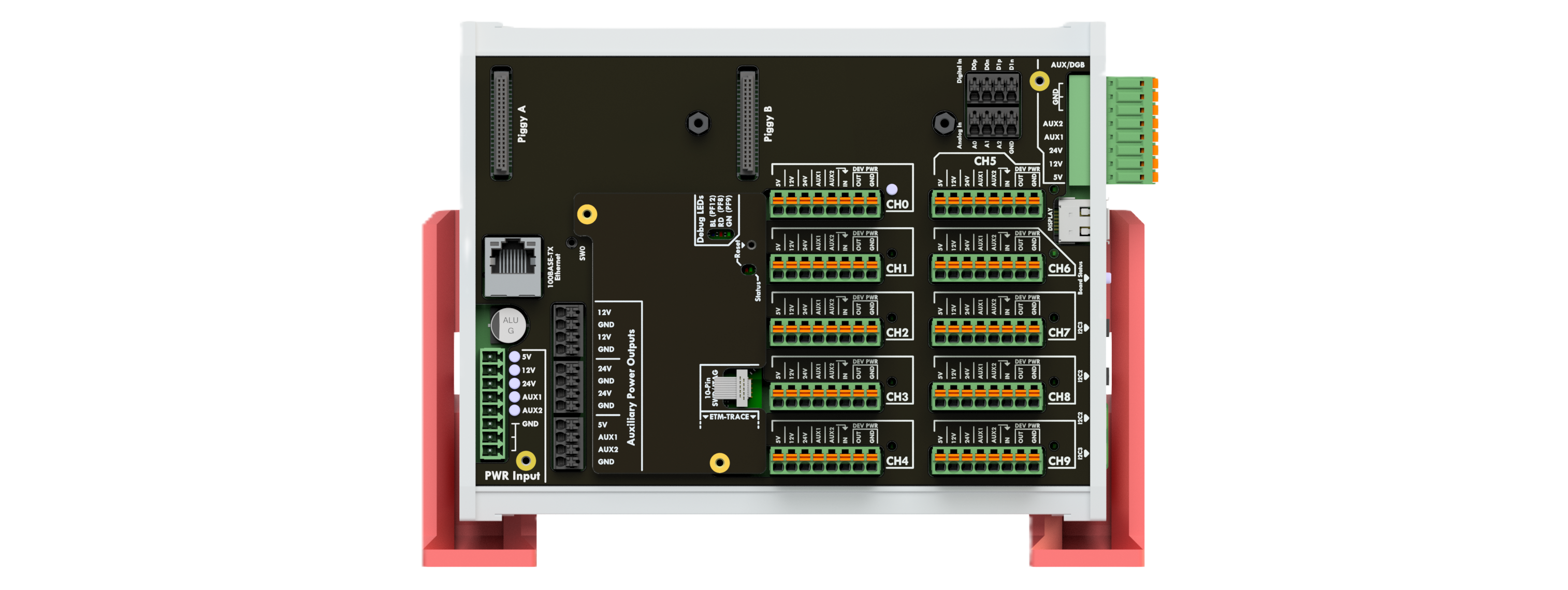
It features a modular design consisting of a controller board and an application board tailored to specific requirements.
The controller board uses the STM32F777 microcontroller with ARM Cortex-M7 core, 512 kB RAM, and 2048 kB dual-bank flash. Additionally, the controller board includes a power sensor for self-diagnosis, switches for reset and application, a 100 Mbps Ethernet PHY, an EEPROM with 32 kbit for configuration data (e.g., Ethernet MAC), and various status and debug LEDs.
The application board offers the following primary properties:
- Switches up to ten devices with a maximum current of 10 A each
- Records current, voltage, and power for each device
- Allows optional use of relay and multiplexer expansion boards via two I2C interfaces to customize the Assembly setup
- Integration of I2C sensors and actuators for simple Assembly measurement tasks, including from CANoe tests
- Two digital inputs for a board status pin (virtual LED) and I2C sensor alert line
- An optional plug-and-play display for local control of connected boards and display of measured values, status, and debug information
- Two piggy sockets for future extensions
The application board also provides maintainers with:
- LEDs for monitoring the input power supply status next to the power input
- Indicators for device switching states next to the device connectors
- Operating status LEDs in the center of the right side for rack operation
- A local power supply connector to connect equipment (such as a logic analyzer or oscilloscope) without impacting HAI monitoring
- Extended debug and status capabilities via the optional plug-and-play display
A REST interface provides access to the HAI feature set. The veHaaS proxy is the primary user of this interface. When using CANoe TscFwHlp, you can also use the CANoe Assembly Manager component for control and monitoring purposes.
Compared to HAIGen1, HAIGen2 provides more computing power, better cost and maintenance efficiency, and advanced monitoring of individual devices combined with greater flexibility for extensions.
Other HAI Types
In selected cases with high power consumption or special output voltage requirements, integration of alternative HAI types on Assemblies with specific needs is also possible. Possible alternatives to HAI Gen1 include: Brennenstuhl Power Strip and Allnet Power Strip. For more detailed information and inquiries, please contact the veHaaS Cluster Services Team.
Evaluation Board
For hardware-dependent software components, testing on the target hardware remains essential. The test engineer can reserve an Assembly with the necessary evaluation board and installed CPU to execute tests easily and automatically.
The evaluation board status is an important element for monitoring. A predefined pin, which is toggled at runtime via vBaseEnv, can be connected to the HAI.
Depending on the board state, the monitoring section in the Web UI displays one of the following statuses:
- Board alive
- Board down
- Digital Status LED not connected
- Digital Status LED connection not possible
Details on connecting to the evaluation board and the connected components are documented in assembly profile and can be viewed in the Assembly View under Setup.
Debugger
For critical tasks such as monitoring, controlling, and analyzing embedded system behavior during development and testing, a debugger is an essential tool.
Within the veHaaS environment, the most commonly used debuggers are:
- Tasking (formerly known as iSystem)
- Lauterbach
Debugger Configuration:
To use these debuggers effectively with veHaaS, refer to the respective setup guides provided by the tool vendors:
Tasking (iSystem): Hardware Configuration Tutorial – winIDEA Help
Lauterbach: Installation Guide – Lauterbach
These guides provide step-by-step instructions for connecting and configuring the debuggers for use with veHaaS.
Network Interfaces
For testing and validation of software components, network interfaces are essential. Depending on the software under test (SUT) and available bus and network systems on the evaluation board, different network interface products from the Vector families VN, VH, and VT are integrated on the Assembly.
A detailed overview of network interfaces and their user manuals is available at vector.com: Network Interfaces.
Other Devices
In addition to the main devices, Assemblies may include auxiliary equipment for specialized tasks, such as:
- Logic Analyzer: for capturing and analyzing digital signal activity
- PicoScope: a compact oscilloscope for high-resolution signal inspection
- Network Transceiver: for interfacing with and analyzing communication protocols
Assembly Consumption Panel
The Assembly consumption panel is a veHaaS feature designed to help developers understand the current consumption of different Assembly devices. The system provides a time-based graph of power consumption, enabling real-time analysis of energy usage. Each plotted curve corresponds to specific power domains: with HAIGen1, each curve represents a specific power supply rail (e.g., 5V, 12V, 24V) with a distinct color; with HAIGen2, each curve represents a specific connected device with a distinct color. This allows developers to monitor individual power domains and identify potential issues such as voltage drops, irregular consumption patterns, or power spikes during operation.
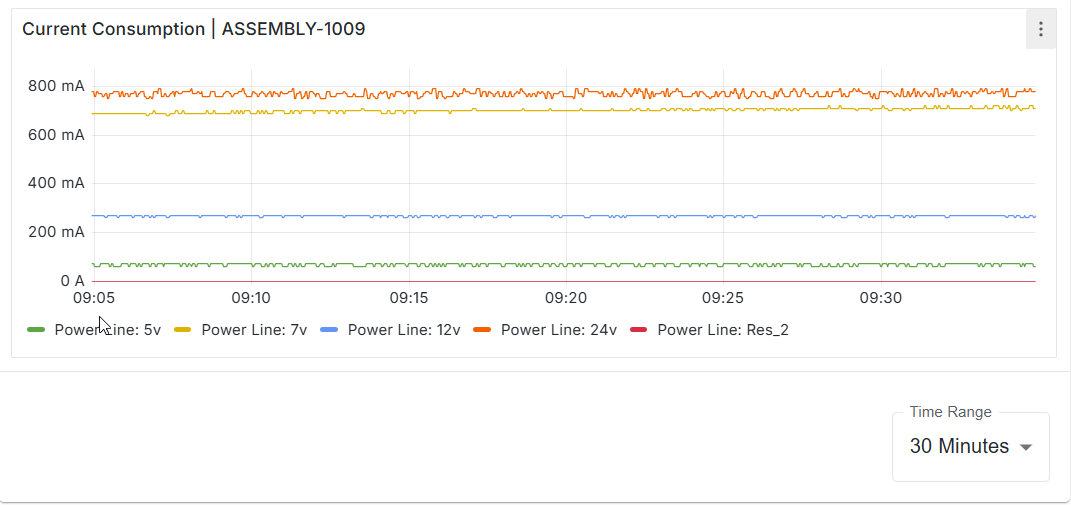
The time range displayed in the consumption graph can be configured by selecting the desired interval from the dropdown menu located beneath the consumption window.