Assembly Managing
To control (switch on/off) devices of an Assembly during C# test execution (with CANoe), a C# AssemblyManager implementation is available. The AssemblyManager mechanism is described in detail below.
Introduction / Motivation
Some test cases require Assembly devices to be switched on and off during test execution. Using the manager library enables the tester to easily manage and control the Assembly device without knowledge about access handling or REST specifics. Communication via HTTPS synchronizes the veHaaS Web UI Assembly device status as shown below.
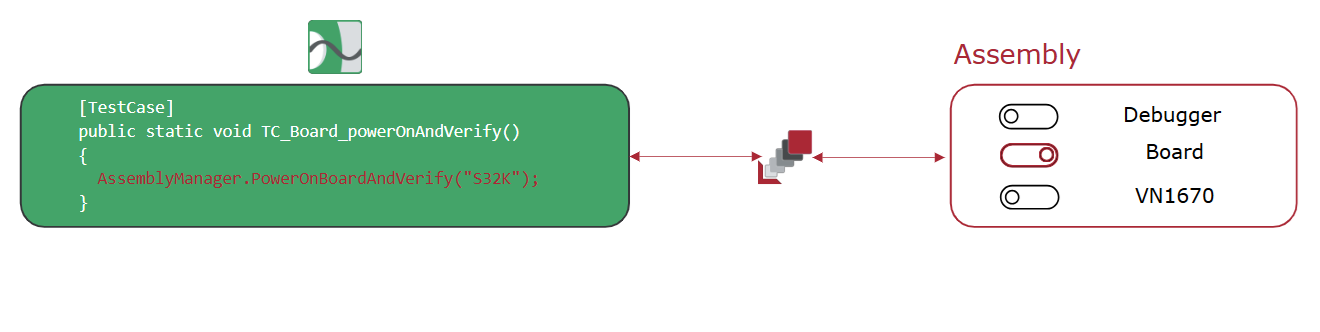
Integration
To control devices of an Assembly within the testers environment, some steps are necessary which are described below.
- Integrate the PES veHaaS Assembly Manager to your .NET test environment. Get the latest release from Artifactory pes-vehaas-assembly-manager artifactory repository.
- Place the files into your Testsuite in oder to use it during your Testcase Implementation (with vTESTstudio or Visual Studio).
- Enable CANoe to send HTTPS requests to the veHaaS Backend.
CANoe Options -> Extensions -> Connectivity -> Enable HTTP Service - Add HTTPAPI.vcdl and Serialization.vcdl to your CANoe configuration via
Simulation -> Communication Setup -> Data Source -> Load Data Source. - Within
Assembly_User.csthe tester is supposed to make parameter adjustments. - (Mandatory) Add your veHaaS Token
VEHAAS_TOKENto get control access rights during test execution.💡 If you are using this Testsuite in your team, you can also use a team token Access Token.
- (Optional, but recommended) Downloads JSON Assembly description file (
veHaaS Assembly -> Assembly Setup -> Download). After downloading reference the file forASSEMBLY_DESCRIPTION_FILE_PATH. Recommended: Next toHTTPAPI.vcdl.
More information can be found on Gitlab pes-vehaas-assembly-manager.
veHaaS AssemblyManager public interfaces (API)
The AssemblyManager provides functionality to control your Assembly during test execution.
💡 Tip: Each PowerOn... and PowerOff... method has a corresponding PowerOn...AndVerify() or PowerOff...AndVerify() variant, which performs the action and verifies its success.
| Method | Description | Parameters | Return Type |
|---|---|---|---|
PowerOnAssembly() |
Powers on all Assembly devices. | None | void |
PowerOffAssembly() |
Powers off all Assembly devices. | None | void |
PowerOnBoard(string name = null, int? id = null) |
Power on veHaaS Assembly board. | name (optional) - Name of the boardid (optional) - ID of the device |
void |
PowerOffBoard(string name = null, int? id = null) |
Power off veHaaS Assembly board. | name (optional) - Name of the boardid (optional) - ID of the device |
void |
BoardPowerCycle(int waitDuration, string name = null, uint? id = null) |
Powercycle veHaaS Assembly board. | waitDuration - Duration to wait between power on and power off [ms]name (optional) - Name of the boardid (optional) - ID of the device |
void |
PowerOnDebugger(string name = null, int? id = null) |
Power on veHaaS Assembly Debugger. | name (optional) - Name of the debuggerid (optional) - ID of the debugger |
void |
PowerOffDebugger(string name = null, int? id = null) |
Power off veHaaS Assembly Debugger. | name (optional) - Name of the debuggerid (optional) - ID of the debugger |
void |
PowerOnGenericDevice(string name = null, int? id = null) |
Power on any generic veHaaS Assembly Device. | name (optional) - Name of the deviceid (optional) - ID of the device |
void |
PowerOffGenericDevice(string name = null, int? id = null) |
Power off any generic veHaaS Assembly Device. | name (optional) - Name of the deviceid (optional) - ID of the device |
void |
SetMuxConnection(uint mutually_exclusive_block_id = 0, uint active_connection_id = 0) |
Set multiplexer channel. | mutually_exclusive_block_id - block IDactive_connection_id Active connection ID |
void |
| Info methods | |||
GetAssemblyOverview() |
Provides information about connected Assembly devices. | None | void |
GetAssemblyHais() |
Gets all HAIs which are part of veHaaS assembly. | None | void |
GetAssemblyDevices() |
Gets all veHaaS Assembly devices. | None | void |
Example
/* Simple Testcase controlling an Assembly. */
public void TC_Example_TestCase()
{
  /* Switch the Board to ON. */
  AssemblyManager.PowerOnBoardAndVerify("S32K");

  ...

  /* Switch the multiplexer with ID = 0 to the dedicated connection 3. */
  uint mutually_exclusive_block_id = 0;
  uint active_connection_id = 3;
  AssemblyManager.SetMuxConnection(mutually_exclusive_block_id,active_connection_id);

  /* Power off the Assembly. */
  AssemblyManager.PowerOffAssembly();
}