Channel Multiplexing
Introduction
This chapter provides detailed information on the multiplexing functionality of veHaaS Assemblies for test engineers. This feature offers greater flexibility in configuring Assemblies. By integrating the Multiplexer-Board, Assembly peripheral modules can be used in various ways according to different requirements. This increases the coverage of changing use cases per Assembly, which improves availability, reduces waiting time, and increases development speed.
Functional Overview
The Multiplexer-Board is integrated at the Assembly level during the initial setup of Assemblies by the veHaaS Cluster Team. In the GUI, multiplexer hardware is structured as a mutually exclusive block. Each block has preconfigured channel connections available as Mutually Exclusive Connections. A channel can be selected from the available options for each multiplexing device, as shown below. For easier development, the connected PINs are visible in the respective connection.
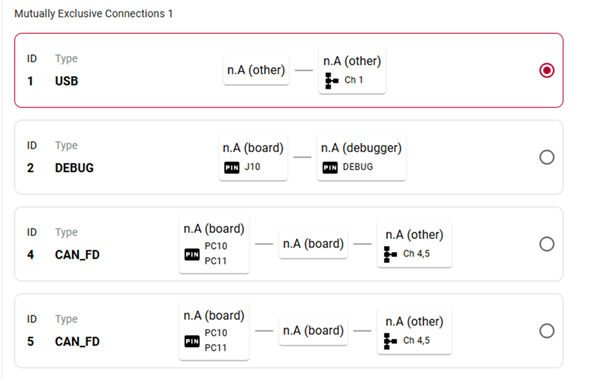
Multiplexer-Board GUI channel selection.
Multiplexer configuration
It is possible to use up to eight Multiplexer-Boards in the same Assembly. A connection can be established between a channel (e.g., CH A) and COM, as seen below.
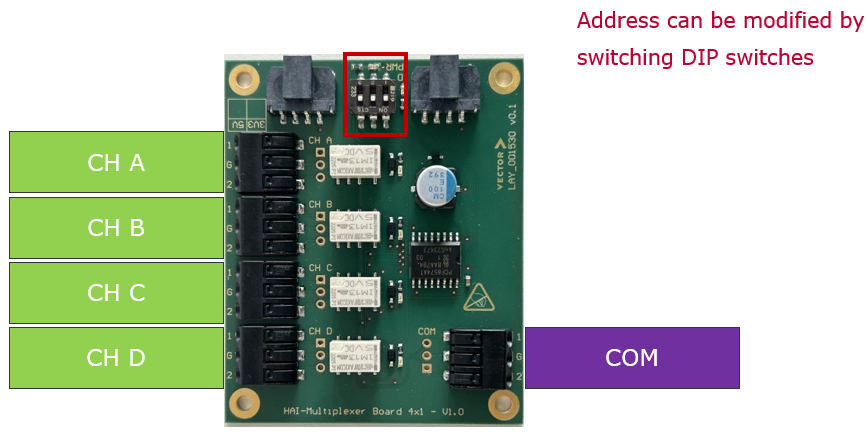
Multiplexer-Board four channel switching.
Limitations
- Only one channel can be switched at a time, meaning only one channel is active.
- The Multiplexer-Board address is fixed and can only be changed by the vCS Team.
Multiplexing endpoints
The multiplexer is controlled by the Assembly HAI. Therefore, the respective HAI can be instructed to configure the hardware.
Caution
The multiplexing devices have to be initialized by setting the hardware to channel O.
Limitations
The status endpoint requires a mux_address (two-digit hex number with "0x" prefix, e.g., 0x38). For the configuration endpoint, an additional channel parameter is necessary: a capital character from A to D representing channels, or capital O for all channels off.
-
Status endpoint: Used to get the current state of the multiplexer hardware.
-
Configuration endpoint: Used to configure the Multiplexer-Board hardware.
Integration & Automated Control
As previously described, the multiplexing devices can be controlled by the veHaaS GUI. Another convenient method is to integrate the AssemblyManager into your CANoe tests. This way, channel switching can be directly linked to a test run. Read more here: Assembly Manager.
Known Errors and Solutions
Could not fetch 'multiplexed connections'
This error occurs when a matrix switch returns a state that is not supported by the Multiplexing configuration endpoint status query, leaving the multiplexer with no defined state. This results in the error message shown below. You can resolve this error by using the configuration endpoint to set a defined state.

Multiplexer in undefined state error.