Organization and Visibility Structure
Almost nothing in vHaaS is visible to everyone. Assemblies, Clusters, Groups, Users, and Access Tokens belong to an Organization, and often to a Group inside it. What you see in the UI and what the API returns for you follows from your membership in those containers.
Two consequences are worth knowing before anything else:
- You only ever work with the resources your memberships grant you. The overview, the Explorer, the search, and the API all return the same filtered set — a resource you have no relationship to is simply not listed.
- Visibility equals bookability. Everyone who can see an Assembly can also reserve it and connect to its Execution Environment. Sharing is therefore always a deliberate decision, not a convenience.
The structure at a glance
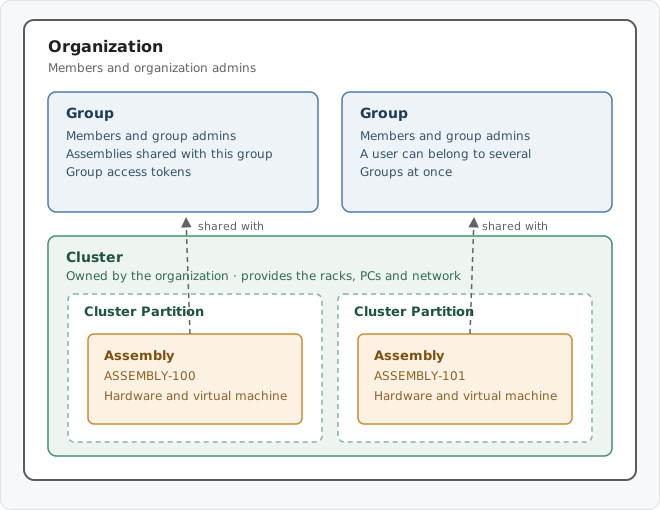
Organizations contain Groups and Clusters. Assemblies are physically hosted in a Cluster Partition and are shared with Groups or with the whole Organization.
| Level | What it holds | Who can see it |
|---|---|---|
| Organization | Users, Groups, Clusters, Assemblies | Its own members |
| Group | Users, Assemblies, Group Access Tokens | All members of the parent Organization |
| Cluster (with Partitions) | Execution Environments, IP addresses, sensors, Assembly slots | All members of the owning Organization |
| Assembly | Hardware, Assembly Profile, Sessions | See Assembly visibility |
| Personal | Personal Access Token, SSH key, environment variables, cleanup and mount paths | Only you |
Organizations
An Organization is the top-level container for a company, a department, or a project. Every user belongs to at least one Organization and can belong to several.
There are two roles:
| Role | Can do |
|---|---|
| Member | See all users, Groups, and Clusters of the Organization. See the Assemblies shared with them. Create Groups and Assemblies. |
| Organization admin | Everything a member can do, plus: manage users and their roles, create and delete Groups, manage Clusters and Cluster Partitions, and manage Organization-level Access Tokens. |
An Organization admin is an admin everywhere in the Organization
Organization admins are automatically admins of every Group in their Organization, and therefore admins of every Assembly that is assigned to the Organization or shared with one of its Groups — including Assemblies they do not own. This applies even when the "Public in Organization" toggle is off.
Groups
A Group is a sub-unit of exactly one Organization and cannot exist on its own. Groups are the normal way to share Assemblies with a specific team instead of the whole company.
- A user can be a member of many Groups at the same time.
- Every member of the parent Organization can see that a Group exists and who is in it. Being able to see a Group does not grant access to the Assemblies shared with it — that requires membership in the Group, or admin rights in the Organization.
- Group admins manage the Group: membership, Assembly assignments, and Group Access Tokens.
Working with partners and suppliers
Nothing in vHaaS crosses the Organization boundary. To be added to a Group, a user must already be a member of the Organization that Group belongs to. An Assembly cannot cross it either: it belongs to exactly one Organization and can only be shared with Groups of that same Organization.
To give someone from another company access, add them to your Organization. A user can belong to several Organizations at once, so a supplier's engineer can be a member of both their own Organization and yours. Add them to your Organization first, then to the Groups they need.
This makes them a full member of your Organization
An invited partner sees all users, Groups, and Clusters of your Organization — not just the Assemblies shared with their Groups. Use Groups to keep the Assemblies themselves separate.
Clusters and Cluster Partitions
A Cluster belongs to one Organization. All members of that Organization can view the Cluster and its Execution Environments, IP addresses, and sensors; only Organization admins can modify it, register hardware, or reach Monitoring and Logs.
A Cluster Partition can be assigned to a different Organization than the Cluster itself, which allows one physical rack to serve several Organizations. Members of the Organization that owns the Cluster can see all of its Partitions; members of an Organization that only owns a Partition see just that one.
Clusters that Vector operates on your behalf appear as Managed Resources. You can see and book the Assemblies in them, but you hold no admin permissions on the Cluster itself. See Cluster ownership.
Execution Environment credentials
Being able to see an Execution Environment does not reveal its credentials. Credentials are readable only by the Organization admins who manage the Cluster, and by the user who currently holds an active Session on the Assembly the Execution Environment belongs to.
Assembly visibility
An Assembly belongs to exactly one Organization. Within that Organization you decide who can see and book it when you upload the Assembly Profile, and you can change that decision at any time in the Assembly settings. Access is granted through three independent mechanisms, and any one of them is enough:
| Mechanism | Who gains access |
|---|---|
| Assembly owner | The users listed as owners. They always have full admin rights, regardless of Group membership. |
| Shared with a Group | Every member of that Group. |
| Public in Organization enabled | Every member of the Organization the Assembly belongs to. |
An Assembly can be shared with several Groups at the same time, and the resulting access is the sum of all of them.
Warning
The Assembly is visible and bookable for all members of every Group you share it with, and for the whole Organization once Public in Organization is on. The Group admins of those Groups additionally become admins of the Assembly — they can change its access settings, end running Sessions, and delete it.
Public in Organization
Every Assembly belongs to an Organization. The Public in Organization toggle decides whether that membership alone is enough to reach it:
- On — every member of the Organization sees and can book the Assembly.
- Off — ordinary members see nothing. Access is limited to the owners, the Organization admins, and the members of any Groups the Assembly is shared with.
Use Groups when a specific team needs the hardware, and Public in Organization when the Assembly is a shared resource for everyone in the company.
Example
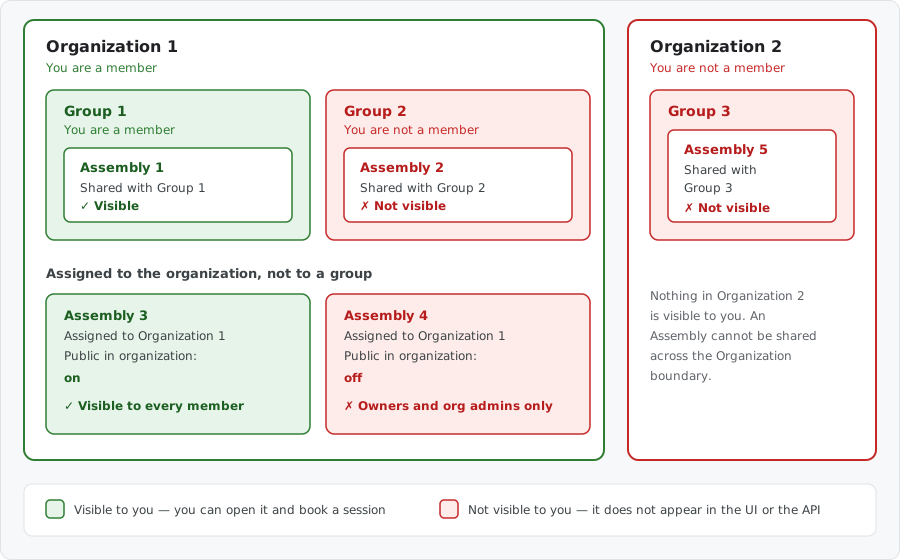
You are a member of Organization 1 and of Group 1.
| Assembly | Shared through | Visible to you |
|---|---|---|
| Assembly 1 | Group 1 | Yes — you are a member of Group 1 |
| Assembly 2 | Group 2 | No — you are not a member of Group 2 |
| Assembly 3 | Organization 1, Public in Organization on | Yes — you are a member of Organization 1 |
| Assembly 4 | Organization 1, Public in Organization off | No — owners and Organization admins only |
| Assembly 5 | Group 3 in Organization 2 | No — you are neither in Organization 2 nor in Group 3 |
An Assembly is visible as soon as one of the three mechanisms matches your memberships. Assembly 2 would therefore become visible to you the moment it is additionally shared with Group 1 — its sharing with Group 2 stays untouched.
Assembly 5 is out of reach whatever you do from here: it belongs to Organization 2, and an Assembly can neither be moved to another Organization nor shared with a Group outside its own. Only membership in Organization 2 would change that.
Roles on an Assembly
| Capability | Assembly user | Assembly admin |
|---|---|---|
| See the Assembly, its profile, and its calendar | ✓ | ✓ |
| Book a Session and connect to the Execution Environment | ✓ | ✓ |
| Run device sequences and control the hardware during your Session | ✓ | ✓ |
| Change which Groups it is shared with, and the Public in Organization toggle | ✓ | |
| Upload a new Assembly Profile, edit or delete the Assembly | ✓ | |
| End or take over another user's Session | ✓ |
Assembly users are members of a Group the Assembly is shared with, or members of its Organization when Public in Organization is enabled.
Assembly admins are the Assembly owners, the Group admins of every Group it is shared with, and the Organization admins of its Organization.
Visibility of everything else
Users
You can see all users of the Organizations you belong to. Because Group membership requires Organization membership, everyone you share a Group with is already included.
Technical users — the system accounts behind Group and Organization Access Tokens — are managed by the admins of the Group or Organization they belong to.
Sessions and bookings
Everyone who can see an Assembly can also see its bookings in the calendar, including who booked which slot. Only the user who holds a Session can actually use it; admins of the Assembly can end a Session or force a Session transfer.
Access tokens
A scoped Access Token carries the permissions of the Group or Organization it was created in, so its visibility follows the same structure. A personal Access Token acts with your own permissions and is visible only to you.
| Token | Visible to | Created in |
|---|---|---|
| Scoped — Organization | Organization admins | Explorer, Organization view |
| Scoped — Group | Group admins | Explorer, Group view |
| Personal | Only you | Profile |
The Explorer does not list every token you can reach
By default, the Explorer shows the Groups, Assemblies, users, and Clusters you have access to, but for Access Tokens it only lists the tokens of the current context. Navigate to the specific Group or Organization to see its tokens.
Device catalog
Device suppliers, model families, and model versions used in Assembly Profiles are either published globally — visible to all vHaaS users — or created inside an Organization, in which case only its members can see and use them.
Related Topics
- Assembly — what an Assembly is and what it contains
- Cluster — the hardware unit that hosts Assemblies
- Manage Assembly Access — change who can see and book an Assembly
- Manage Groups — create Groups and manage their membership
- Access Tokens — authenticate CI pipelines with the right scope