HAI.Gen2
HAI.Gen2 is the Hardware Automation Interface (HAI) used in vHaaS Assemblies. It covers three core functions:
- Controlling connected devices (switching them on/off)
- Monitoring their electrical state (current, voltage, power per channel)
- Test configuration setup (reconfiguring the test setup via optional I2C relay and multiplexer extension boards)
This page describes the device itself; for the general role of an HAI within an Assembly, see Assembly.
Overview
HAI.Gen2 has a modular design consisting of a controller board and an application board tailored to specific requirements.
The application board offers:
- Switching of up to ten devices, each with a maximum current of 7 A
- Per-device current, voltage, and power recording
- Optional relay and multiplexer extension boards via two I2C interfaces — see Channel Multiplexing and Relay Card & Jumpers below
- Integration of I2C sensors and actuators for simple Assembly measurement tasks, including from CANoe tests
- Two digital inputs for a board status pin (virtual LED) and I2C sensor alert line
- An optional plug-and-play display for local control of connected boards and display of measured values, status, and debug information
- Two piggy sockets for future extensions
For maintainers, the application board also provides input power supply LEDs, device switching state indicators, rack operating status LEDs, a local power supply connector for auxiliary equipment (e.g., logic analyzer or oscilloscope) that doesn't affect HAI monitoring, and extended debug/status output via the optional display.
Channels
HAI.Gen2 exposes 10 controlled device channels (0–9). Each channel switches one device output and has a dedicated power sensor that measures voltage and current. These measurements can be retrieved from the Monitoring view.
Status LED
The onboard status LED indicates the current device state:
| Pattern | Meaning |
|---|---|
| Yellow (solid, startup) | Hardware initialization |
| Blue (solid, startup) | System configuration (EEPROM parameters, board settings, power setup) |
| Violet (solid, startup) | Network services starting up |
| Green (flashing) | Normal operation, Assembly free (no active session) |
| Blue (flashing) | Normal operation, Assembly session active |
| Red (solid) | Fault — device not operating normally |
Note
The distinction between flashing green (no active session) and flashing blue (session active) reflects vHaaS session state layered on top of the device's normal-operation indication.
A dedicated LED next to each device connector also lights up as soon as the corresponding channel is switched on.
Channel Multiplexing
The Multiplexer-Board is an optional I2C extension module for the HAI.Gen2. By integrating it, Assembly peripherals can be used in various ways according to different requirements, which increases the coverage of changing use cases per Assembly — improving availability, reducing waiting time, and speeding up development.
Functional Overview
The Multiplexer-Board is integrated at the Assembly level during the initial setup of Assemblies by the vHaaS Cluster Team. In the GUI, multiplexer hardware is structured as a mutually exclusive block. Each block has preconfigured channel connections available as Mutually Exclusive Connections. A channel can be selected from the available options for each multiplexing device, as shown below. For easier development, the connected PINs are visible in the respective connection.
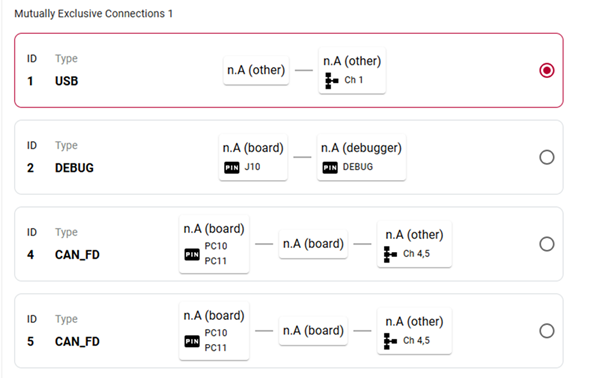
Multiplexer-Board GUI channel selection.
Multiplexer configuration
It is possible to use up to eight Multiplexer-Boards in the same Assembly. Each Multiplexer-Board provides a 1:4 topology with a maximum switching current of 2 A per channel. A connection can be established between a channel (e.g., CH A) and COM, as seen below.
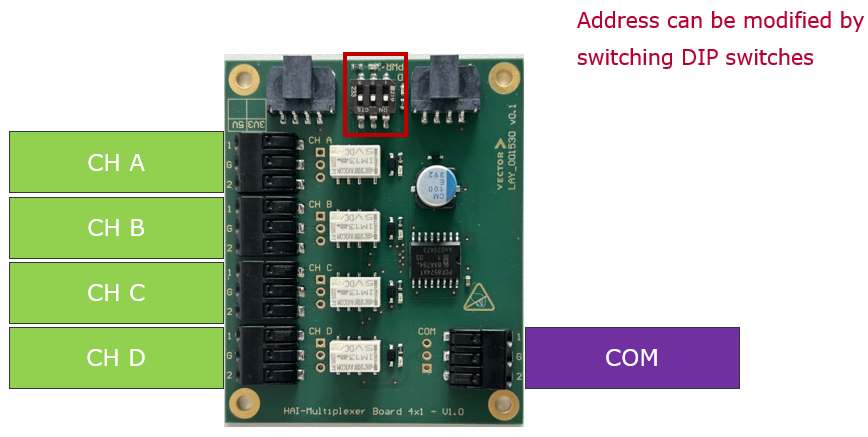
Multiplexer-Board four channel switching.
Limitations
- Only one channel can be switched at a time, meaning only one channel is active.
- The Multiplexer-Board address is fixed and can only be changed by the vHaaS support team.
Automated control
The multiplexer is controlled through the Assembly HAI — from the vHaaS GUI, from CANoe tests via the Assembly Manager, or directly through the HAI REST API. See the Assembly Automation workflow for the multiplexer status and configuration endpoints.
Known Errors and Solutions
| Symptom | Likely cause | Solution |
|---|---|---|
| Could not fetch 'multiplexed connections' | A matrix switch returned a state not supported by the multiplexing configuration endpoint status query, leaving the multiplexer with no defined state. | Use the configuration endpoint to set a defined state. |
Relay Card & Jumpers
Starting with HAI.Gen2, the usage of relay cards is supported. The relay card is an optional I2C extension module for HAI.Gen2. By integrating it, Assembly peripherals can be used differently according to varying requirements, which increases the coverage of changing use cases per Assembly — improving availability, reducing waiting time, and speeding up development.
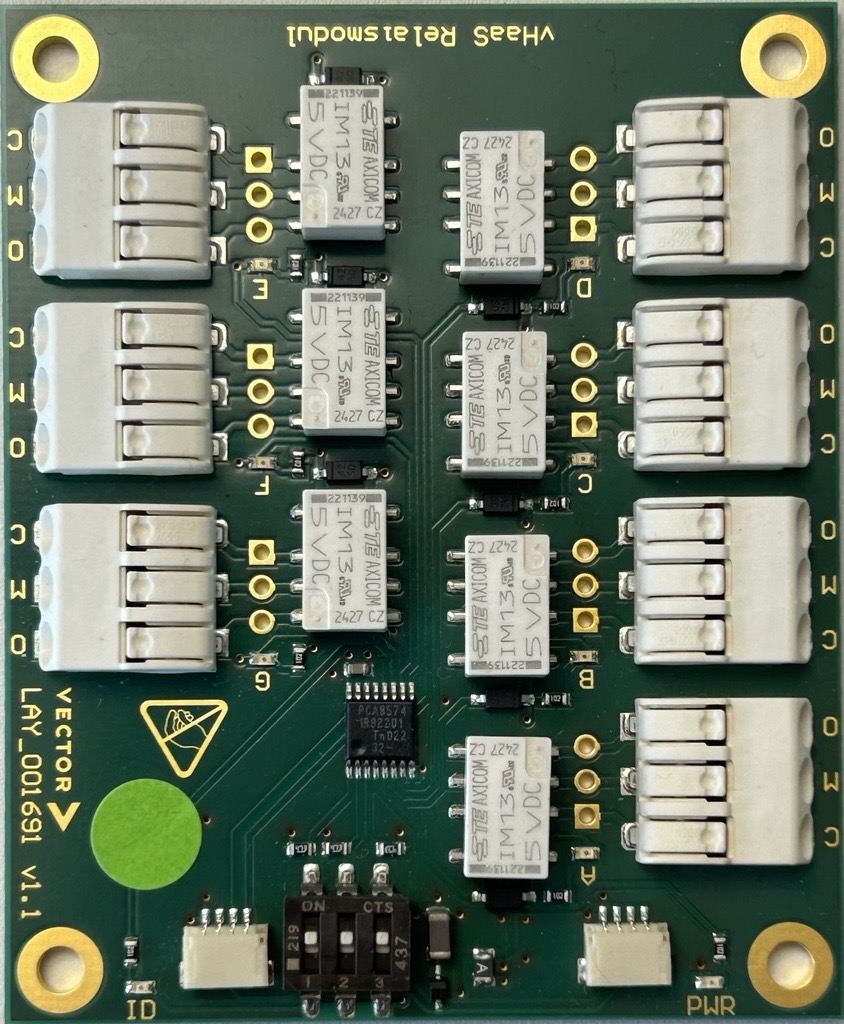
Functional Overview
The relay card enables physical customization of an Assembly with up to seven independent channels
per card. Channels can be used during setup or operation — for example, to simulate faults such as
line breaks. Another use case is switching devices on/off without requiring the current
monitoring functionality included in the HAI.Gen2 channels. The relay card also provides the
opportunity to control more devices in hardware setups where the HAI's 10 channels are
insufficient.
The relay card is integrated at Assembly level during the initial setup of Assemblies by the
vHaaS Cluster Service Team. In the GUI, multiple relays are structured as a block. Each block has
the preconfigured channel connections available. A channel can be set to on/off during setup
or measurement.
Relay card configuration
It is possible to use up to eight relay cards in the same Assembly. A connection can be established between a channel (e.g., CH A) and the power signal 5V, GND, or an open line. Unlike multiplexing, more than one channel can be switched non-exclusively, which means that multiple channels can be active at the same time. Each relay card provides 7 independently switchable channels, labeled A through G, with a maximum switching current of 2 A per channel.
Limitations
The relay card's I2C address is fixed and can only be changed by vHaaS maintainers.
Automated control
The relay card is controlled through the Assembly HAI — the respective HAI can be instructed to configure the hardware via its REST API.
Both the status and configuration endpoints address a specific card via the i2c-address path
parameter (a two-digit hexadecimal string, e.g., 0x27). For the configuration endpoint, the JSON
body is an array of channel entries, each with:
- channel: the relay channel to update, represented as a capital character from A to G.
- status: the desired channel state, either
"on"or"off".
Multiple channel entries can be included in a single request.
-
Status endpoint — used to get the current state of the relay card hardware:
-
Configuration endpoint — used to configure the relay card hardware:
Jumpers
A jumper is a physical short-circuit connector that routes a HAI.Gen2 channel to a specific device or signal line (e.g. 5V, GND, or open line). Together with the relay card, jumpers allow the physical wiring of an Assembly to be reconfigured without hardware disassembly.
Related
- Assembly — how HAI.Gen2 fits among an Assembly's other devices
- Monitoring — live per-channel measurements and where to view them