Architecture and Structure
Overview
veHaaS (Virtual Hardware as a Service) is a system that manages access to physical and virtual test hardware over a network. It lets users and CI pipelines discover available Assemblies, book them for a session, connect to the associated Virtual Machine, and release them when done — without needing direct physical access.
The system handles scheduling, allocation, credential delivery, and health monitoring automatically.
System Components
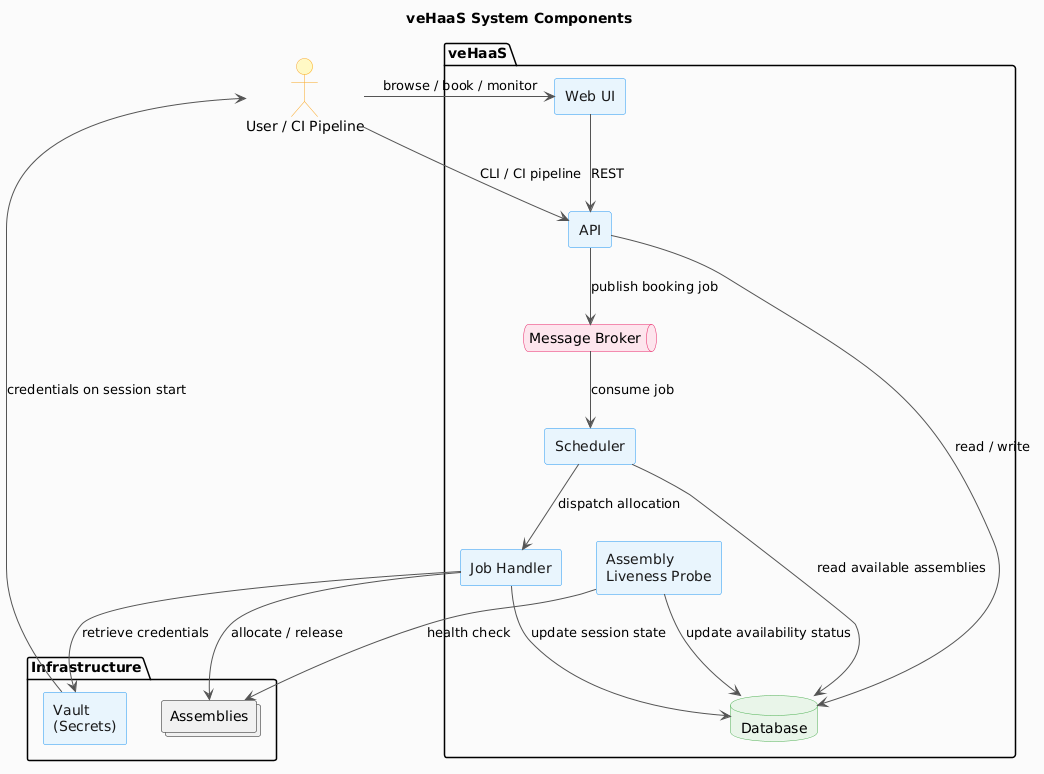
The following components make up a veHaaS instance. You interact with some of them directly; others work in the background to keep sessions running smoothly.
| Component | What it does |
|---|---|
| Web UI | Browser-based interface for browsing Assemblies, booking sessions, monitoring status, and managing your profile and organization. |
| API | REST API consumed by the Web UI, the veHaaS CLI, and CI pipelines. All booking and session management actions go through the API. |
| Scheduler | Receives booking requests and finds the best matching available Assembly based on the requested profile and labels. |
| Job Handler | Executes the actual allocation and release actions — locks an Assembly for your session or unlocks it after release. |
| Vault | Manages VM credentials securely. Credentials are delivered to you automatically when your session becomes active. |
| Assembly Liveness Probe | Continuously checks the health of all connected Assemblies and updates their availability status in real time. |
Component Diagram
The diagram below shows how the main components interact when you submit a booking request.
How a Booking Works
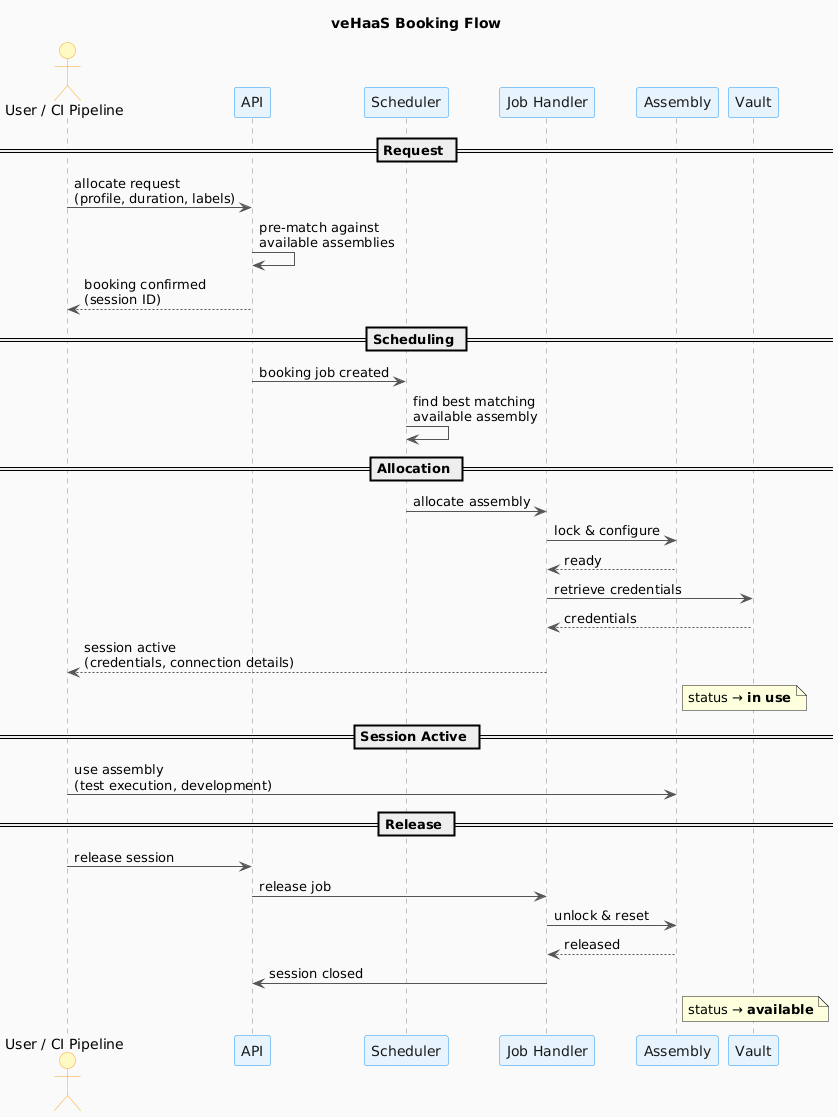
When you allocate an Assembly — whether through the Web UI, the CLI, or a CI pipeline — veHaaS runs through the following steps automatically:
- Request — You send an allocate request specifying the hardware profile and desired session duration. The API pre-matches your request against currently available Assemblies and confirms the booking.
- Scheduling — The Scheduler picks up the booking job and selects the best matching Assembly from the available pool.
- Allocation — The Job Handler locks the Assembly for your session, configures it, and retrieves your VM credentials from Vault.
- Session active — The Assembly status changes to in use. Your credentials and connection details are delivered and the session is live.
- Release — When you release the session, the Job Handler resets the Assembly. Its status returns to available for the next user.
Assembly statuses
An Assembly can be in one of three states visible to you: available (ready to book), in use (held by an active session), or not reachable (the liveness probe cannot reach it).
System Structure
veHaaS organises all resources in a four-level hierarchy:
Every Assembly, user, and group belongs to at least one Organization. Visibility and access are controlled at the Organization and Group level — an Assembly is only visible to you if it belongs to an Organization or Group you are a member of.
For a full explanation of how visibility rules work, see Organization and Visibility.
See also
- Cluster — physical grouping of hardware units that host Assemblies
- Virtual Machines — the VM provisioned for you during a session
- Organization and Visibility — how Organizations, Groups, and access control work